
- Solve real problems with our hands-on interface
- Progress from basic puts and calls to advanced strategies
Interactive Options Course
Lesson 2 of 7
Interactive Brokers offers trading in overnight hours for over 10,000 US-listed stocks and ETFs. Market data is provided for free, and existing US stock trading permission is sufficient to allow trading. Trades can be placed within TWS, Client Portal and Mobile TWS. Overnight trading hours are from 8:00pm ET to 3:50am ET with the first session beginning on Sunday at 8:00pm ET and the last session ending at 3:50am ET on Friday. Trades executed between 8:00pm and 12:00am will carry a trade date of the following day. For a full listing of the available stocks and ETFs see the exchange listing page on the website.
When logged into Client Portal locate the Trade button in the upper right corner of the screen.
Important: The user must first enter a symbol, but second select the Overnight trading venue.
Enter the symbol you want to trade. In this case the user enters symbol F for Ford Motor Co., and then clicks on Stock beneath. Next, the user must scroll down to the time-in-force selector and from the dropdown menu select Overnight.
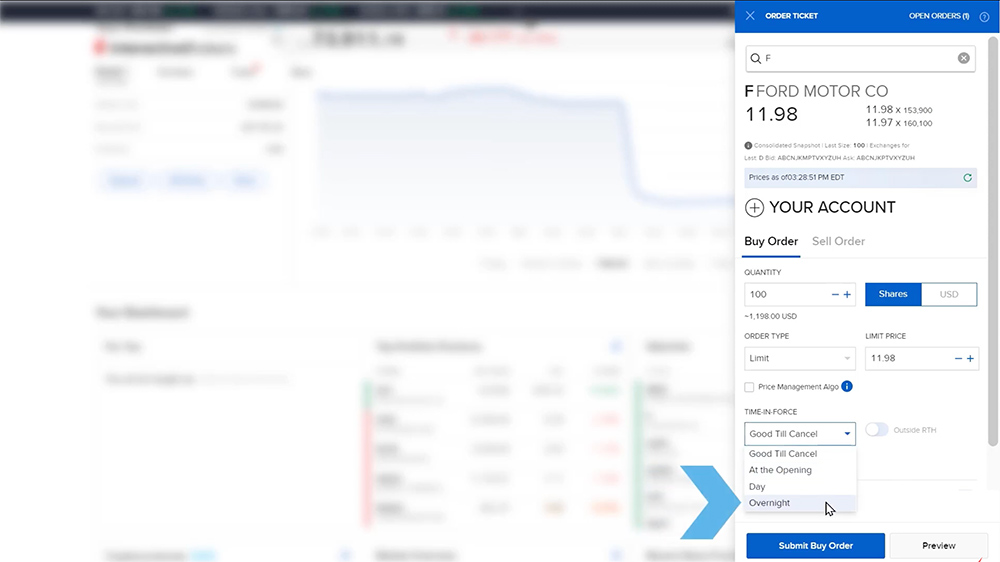
Select Buy Order or Sell Order. In this case the user wants to buy shares in Ford. Next, enter a quantity in either number of shares or enter a dollar amount. Use the button to the side to determine Shares or Dollars. In this example the user selects 10 shares. Next, the user must enter a Limit price for this buy order. Due to liquidity restrictions, overnight trading requires limit orders only.
The user may click on the Preview button to review the order ticket. Scroll down to see a matrix explaining the estimated margin impact from executing the trade. When satisfied, the user clicks the Submit button and may see a Mandatory Cap Price pop-up, which they can review and accept. Review the final order message and click OK. At the top of the Order ticket, user can see that the order is pending. By scrolling to the bottom of the order ticket, user may click the Done button to close the ticket.

Note: Overnight orders remain in the system for a single session. If they do not fill overnight, the order will expire and disappear. The client would need to resubmit another overnight limit order the following day.
To cancel or modify the open order click the Trade button once again. To the upper right of the Order Ticket click the Open Orders button. The user should locate the trade to modify or cancel. To the right of the screen user may click the three dots to the right of the Order ID column. The Cancel and Modify buttons will appear where the user may adjust the open order.

For specific platform feedback and suggestions, please submit it directly to our team using these instructions.
If you have an account-specific question or concern, please reach out to Client Services.
We encourage you to look through our FAQs before posting. Your question may already be covered!
The analysis in this material is provided for information only and is not and should not be construed as an offer to sell or the solicitation of an offer to buy any security. To the extent that this material discusses general market activity, industry or sector trends or other broad-based economic or political conditions, it should not be construed as research or investment advice. To the extent that it includes references to specific securities, commodities, currencies, or other instruments, those references do not constitute a recommendation by IBKR to buy, sell or hold such investments. This material does not and is not intended to take into account the particular financial conditions, investment objectives or requirements of individual customers. Before acting on this material, you should consider whether it is suitable for your particular circumstances and, as necessary, seek professional advice.
The views and opinions expressed herein are those of the author and do not necessarily reflect the views of Interactive Brokers, its affiliates, or its employees.










Is there any way to setup rules or workflows so that overnight orders are executed in a particular order? Trading US exchanges from Australia when I need to close or reduce positions before extending or opening new ones is the goal. Where can I find this type of tuition, or help to set up?
Hello, thank you for reaching out. At this time, it is not possible to set up rules so that overnight orders are executed in a particular order. We appreciate your feedback.
is there a special fees for overnight trading. do you allow trading pink sheet OTC stocks?
Hello Abhi, thank you for reaching out. The commission charged during the US overnight session for IBKR Pro accounts is the same commission you are charged during regular trading hours and for IBKR Lite accounts the commission is our standard fixed rate. Please review our Commission structure on our webpage for more information: https://spr.ly/CampusCommissions
In order to trade on the OTC Pink or ArcaEdge markets, you must add the United States (Penny Stocks) trading permissions. You can easily view and manage your trading permissions any time in Client Portal:
https://spr.ly/IBKR_TradingPermissions
Why doesn’t the price chart follow the price quoted overnight?
Hi, thank you for reaching out. Charts can be viewed with trades outside of regular trading hours by using the settings Gear icon in the chart interface. Within the chart settings, there is an option for “Outside RTH trades” which can be enabled to view trading activity outside regular trading hours. We hope this helps!
It seems that it is not currently possible in TWS to place a GTC order that’s active in the main session, outside RTH and overnight. So basically a GTC order that’s active at all times. Requesting IB to have this functionality soon.
Hi Raz, we appreciate your feedback. For more information on the Time in Force for Orders: https://www.interactivebrokers.com.hk/php/webhelp/Making_Trades/Create_Order_Types/timeinforce.htm
Please review the key considerations for trading outside RTH here: https://www.interactivebrokers.com/faq?id=691836583
i would like to trade 0dte options on SPX during overnight sessions, which are executed immediately- i use IBKR desktop and IBKR client portal and have applied for several Trading permissions. Still i am not able to- how to proceed?
Hello, thank you for reaching out. You must request trading permissions to trade specific products. IBKR grants permissions based on your financial profile (e.g. age, liquid net worth, investment objectives, product knowledge and prior trading experience) and sometimes where you are located. Please note that we cannot disclose the requirements needed for specific trading permissions. You can easily view and manage your trading permissions any time in Client Portal:
https://spr.ly/IBKR_TradingPermissions
For more information about Options levels 1-4, visit
ibkr.info/node/4860
You can view the products that can be traded overnight here: https://www.interactivebrokers.com/faq?id=377201119
If you have any additional questions, please create a web ticket for Client Services: https://spr.ly/IBKR_TicketCampus
IBRK portal displays overnight bid/ask but there is no tracking in chart with “Outside RTH” checked. Is there some other setting that needs to be enabled to display the overnight trade in charts?
Hello, thank you for asking. After logging into TWS, click “New Window”> “Chart”. In the Chart Parameters, under “Chart Time Options” check “Show data outside of regular trading hours”. We hope this helps!
I am authorized and trading in the overnight, but only the after market and pre-market shows up on my charts with the “Outside RTH” box checked – not the overnight. Is there a setting in charts that enables the overnight to appear in charts?
Hello, thank you for asking. After logging into TWS, click “New Window”> “Chart”. In the Chart Parameters, under “Chart Time Options” check “Show data outside of regular trading hours”. We hope this helps!
I’m having the same issue, only after-hours & pre-market show with the”Outside RTH” box checked. Could we please get a real answer to this question, instead of repeating unhelpful information? We don’t mean after-hours, or pre-market. We mean overnight, which is usually 8:00 pm ET to 3:50 am ET.
Hello JB, to see why the “Outside of Regular Trading Hours” option is disabled on your Order Ticket, please view this FAQ: https://www.interactivebrokers.com/faq?id=34474091
If you have a time-sensitive trading issue, please create a detailed web ticket: https://spr.ly/IBKR_TicketCampus